
Website Redesign Without Losing Rankings: The Complete SEO-Safe Guide

The worst moment in a website redesign is rarely launch day. It comes three weeks later, when someone opens Search Console and finds that the pages that used to bring in most of the inquiries have dropped out of the results. The new site looks better. Somewhere in the handover, though, the things Google had learned about the old site were lost: the URLs, the page content, the links between pages, the speed.
This guide covers how to redesign a website without that outcome. It explains why redesigns hurt rankings, which types of redesign carry the most risk, and a seven-step process: benchmark, audit the content, choose the platform, map the redirects, rebuild the on-page SEO, launch with a checklist, and monitor. It draws on Google’s own site move documentation, which Google last updated in August 2026, and it closes with how to decide between a refresh, a redesign, and a full rebuild.
Why do website redesigns hurt SEO in the first place?
A redesign hurts SEO when it changes what search engines have learned about your site without telling them what moved. URLs change, content gets cut or rewritten, internal links break, and pages become slower or harder to crawl. Each of those problems is avoidable, and almost every ranking drop after a redesign traces back to one or more of them.
Some movement is normal. Google’s guidance says rankings can fluctuate while it recrawls and reindexes a changed site, and that a small or medium-sized site can take a few weeks or more for new URLs to replace the old ones in results. A lasting loss usually comes from a short list of mistakes:
Development blocks left on. Noindex rules or robots.txt restrictions added during the build go live with the site and tell Google to ignore it. Google lists this first among common migration mistakes.
Redirects pointing to the wrong place, which Google says it sees frequently.
No redirect at all for URLs that earned traffic or links.
Content deleted or rewritten without checking what it ranked for.
Sitemaps and internal links still pointing at old URLs.
Weaker structure, such as pages that were two clicks from the home page now sitting five clicks deep.
A slower site, from heavier images, video, and scripts.
An underpowered server, since Google crawls a migrated site more heavily than usual for a while.
The rest of this guide is the process that prevents these problems, in the order the work should happen.
Does every redesign count as a site move?
No. Google’s site move guidance applies when URLs change, such as moving from HTTP to HTTPS, changing domain, or changing URL paths. A redesign that keeps every URL identical carries less risk, but not zero, because content, internal links, and speed can still change. Sort your project into one of three types first.
Visual refresh
Same URLs, same content, new look. This is the lowest-risk type. Still check page speed, headings, internal links, and whether any text was removed or hidden in the new layout.
Structural redesign
New navigation, new templates, and often new URLs. If any URL changes, this is a site move in Google’s terms and needs a complete redirect plan. Most redesigns that go wrong sit here, because the work looks cosmetic while the URL changes make it technical.
Platform migration
A new CMS or new hosting, such as WordPress to Webflow. Google advises changing only one thing at a time, and gives the example of a new domain, a new CMS, and a new layout done one after another.
Most businesses combine the design and platform changes anyway, which is reasonable for a site with modest organic traffic. If search drives a large share of your leads, combining everything multiplies what can go wrong and makes problems harder to diagnose. Separate the riskiest changes, such as a domain change, from the redesign, and add extra monitoring when you cannot.
Step 1: Benchmark everything before you change anything
After launch, the first question will be whether a drop in traffic is normal fluctuation or real damage. You can only answer it if you recorded what normal looked like. Before design work starts, capture:
Organic landing pages and clicks from Search Console, covering at least 12 months to show seasonality.
Rankings for target keywords and the URL that ranks for each.
A full crawl of the current site: every URL, status code, title tag, meta description, H1, canonical, and indexability.
Backlinks by page, because those are the pages you cannot afford to break.
Page speed and Core Web Vitals for each main template.
Conversion data by landing page, plus how forms, calls, and bookings are tracked today.
Google’s advice for finding the URLs that matter is to start with your sitemaps, check server logs or analytics for the most visited pages, and use the links report in Search Console. It also says to include images, videos, JavaScript, and CSS files, since those URLs move the same way pages do.
If the site has never had a proper technical review, the benchmark is the time for one. Crawl errors and duplicate content are far cheaper to fix on the old site than to carry into the new one, and a technical SEO audit gives the redesign a clean starting point. Save the benchmark in a shared document. Everything that follows is judged against it.

Step 2: Audit the content and decide what to keep, improve, merge, or retire
A redesign is the best chance to remove weak content and the easiest time to destroy strong content by accident. Place every page into one of four groups.
Keep. Pages that rank, earn traffic, or hold backlinks. Keep the URL, main heading, and substance of the copy, and redesign the layout around them.
Improve. Pages with many impressions but few clicks, or ranking between positions five and twenty.
Merge. Thin pages competing for the same query. Combine them and redirect the old URLs to the consolidated page, which Google says is appropriate.
Retire. Pages with no traffic, links, or purpose. If they are not moving, Google says they should return a 404 or 410.
The most common content mistake is rewriting for style. A service page that ranked for "emergency boiler repair" and now carries a headline like "Heating, handled" may keep its URL and still lose the phrase it ranked for. Treat every rewrite of a performing page as a deliberate decision, and keep the language customers search for in the headings and opening paragraph.
Step 3: Choose the platform and site structure with SEO in mind
Changing platform adds risk, which is why Google’s guide suggests using the same CMS as the old site where possible. That is a prompt to decide deliberately, not a ban. If the platform is the reason the site is slow, hard to edit, or limited, changing it is right, and it should be planned as its own risk.
The main options suit different situations. WordPress has the broadest plugin ecosystem. Webflow gives marketing teams direct visual control. A custom build removes platform limits at a higher upfront cost, and a store has its own requirements, covered under ecommerce website development. Our comparison of custom development versus templates goes deeper on the trade-off.
Before committing, check that the platform lets you control URLs, titles, meta descriptions, and canonical tags page by page, handles bulk 301 redirects, outputs clean HTML Google can render, and generates sitemaps, structured data, and hreflang properly.
Design choices are SEO choices too. UI/UX design decides how deep pages sit in the navigation, how much text appears on service and category pages, and whether important content hides behind tabs. A cleaner navigation helps crawling and conversion, but only if it does not bury pages that used to be easy to reach. After launch, use the URL Inspection tool in Search Console to confirm Google sees the content you expect.
Step 4: Build the URL map and redirect plan
If any URL changes, a one-to-one redirect map is the most important document in the project. Google recommends server-side permanent redirects, such as 301 and 308, from old URLs to new ones, and states that these do not cause a loss of PageRank, so there is no need to worry about link credit when you redirect correctly.
Collect the old URLs from the sitemap, crawl, analytics, Search Console, and backlink list, including images and PDFs that earn traffic or links.
Pick the closest equivalent for each, the page serving the same purpose, not the home page.
Redirect straight to the final URL. Googlebot can follow up to 10 hops, but Google advises direct redirects. If a chain is unavoidable, keep it short: ideally no more than three redirects, and fewer than five.
Retire on purpose. Pages with no equivalent return a 404 or 410.
Test in bulk. Crawl the full old URL list and confirm each returns one redirect to a page that loads normally.
Avoid irrelevant redirects. Google warns against sending many old URLs to one unrelated destination, such as the new home page, because it can confuse users and may be treated as a soft 404. Genuine consolidation is the exception. A simple map looks like this:
/services.php?id=4 redirects to /services/website-design/ (one to one)
/blog/2019/10/post-title redirects to /blog/post-title/ (path simplified)
Three thin location pages redirect to one /areas-we-cover/ page (consolidation)
/old-campaign-page returns 410 (retired, no equivalent)
Keep redirects for as long as possible. Google’s guidance is generally at least one year, and it suggests considering keeping them indefinitely for users. Redirects are slower than direct links, so update your own internal links to the new URLs instead of relying on redirects.
Step 5: Rebuild the on-page SEO inside the new design
Every new template needs the on-page basics rebuilt and checked against the benchmark. This is where good SEO details get lost, because designers and developers work from layouts, not from a record of what each page was optimized for.
Title tags and meta descriptions carried over for every performing page.
One clear H1 per page on the same primary topic as before, with headings in logical order.
A self-referencing canonical tag on each new URL, per Google’s migration guidance.
Hreflang annotations updated to the new URLs on multilingual sites.
Structured data carried across and revalidated.
Internal links pointing straight to new URLs.
Image alt text and file names, with image URLs in the redirect plan where they earn traffic.
An updated XML sitemap with only new, indexable URLs.
Speed needs its own check. Redesigns often add weight through hero images, background video, sliders, font files, and third-party scripts. Google’s Core Web Vitals guidance covers the measures of loading, interactivity, and visual stability, and the new templates should be tested against your baseline. If the new design is slower than the old one, fix it before launch. Mobile gets the same attention, since Google predominantly uses the mobile version of a page for indexing, so anything missing from the mobile layout is effectively missing from the index.

Step 6: Test on staging, then launch with a checklist
Launch is a sequence, not a button. The staging site should be blocked from search and the live site must not be, and many launch-day problems come from those two states being swapped. Work through this list before the switch:
Crawl staging and compare it with the benchmark: titles, H1s, canonicals, and status codes on every important page.
List every development block, each noindex rule and robots.txt restriction, and who removes it at launch. Google recommends preparing this in advance.
Load and test the redirect map in bulk.
Prepare the new sitemap and keep the old one. Submitting both lets you watch old URLs drop out and new ones come in.
Test tracking end to end: analytics, tag manager, forms, call tracking, and ad conversion events.
Set up Search Console correctly. Verify every variant of the old and new sites. The Change of Address tool is only for moves between domains or subdomains, not for HTTP to HTTPS, www to non-www, or path changes within a domain.
Tell the host, especially for a large site. Google crawls a migrated site more heavily than usual.
Check speed and Core Web Vitals on the live templates.
Pick the timing. Google suggests moving during lower-traffic periods. Avoid seasonal peaks and major ad campaigns.
Agree a rollback plan and name who watches the site for the first 72 hours.
Google also advises that small and medium-sized sites move all URLs at once, which helps it detect the move and update its index faster, while large sites can move in sections so problems are easier to spot and fix.
Step 7: Monitor the first twelve weeks after launch
Launch starts the monitoring period. Google says a small or medium-sized site can take a few weeks for most pages to move, larger sites take longer, and visibility can fluctuate temporarily. A schedule keeps you from panicking early or ignoring a real problem.
First 24 hours. Confirm robots.txt and noindex settings, hand-test the top 50 redirects, submit the new sitemap, and check forms, calls, and tracking.
Week 1. Review Search Console crawl errors and index coverage, and re-crawl the old URL list for missed redirects.
Weeks 2 to 4. Compare clicks and impressions by page against the benchmark. Old URLs should fall as new ones rise.
Weeks 4 to 12. Rankings for important terms should settle. Review conversion rates and speed.
Month 12 and beyond. Keep the redirects.
Normal looks like temporary dips in impressions, reshuffled positions, and old URLs lingering in results for a few weeks. Warning signs are important pages missing from the index, new pages excluded by noindex, a spike in not found or redirect errors, or a decline that continues well past the first several weeks.
Two follow-up jobs are easy to forget. Update the links you control and ask the most valuable external sites to update theirs. Google recommends prioritizing by the visits each link sends, which suits link building outreach. And point every paid campaign at the new landing pages, since a PPC account sending clicks through redirects or to dead pages wastes budget on the pages you just rebuilt.

What can a well-run redesign actually deliver?
A redesign is a risk to manage, but it is also the best chance to fix speed, structure, conversion paths, and thin content. Google reported that three months after migrating and redesigning its Search Central blog, the blog had improved 159% in clicks and 23% in impressions, which it attributed to the migration and redesign. That was a documentation site with a clear plan, not a typical business site, but it shows what careful planning makes possible.
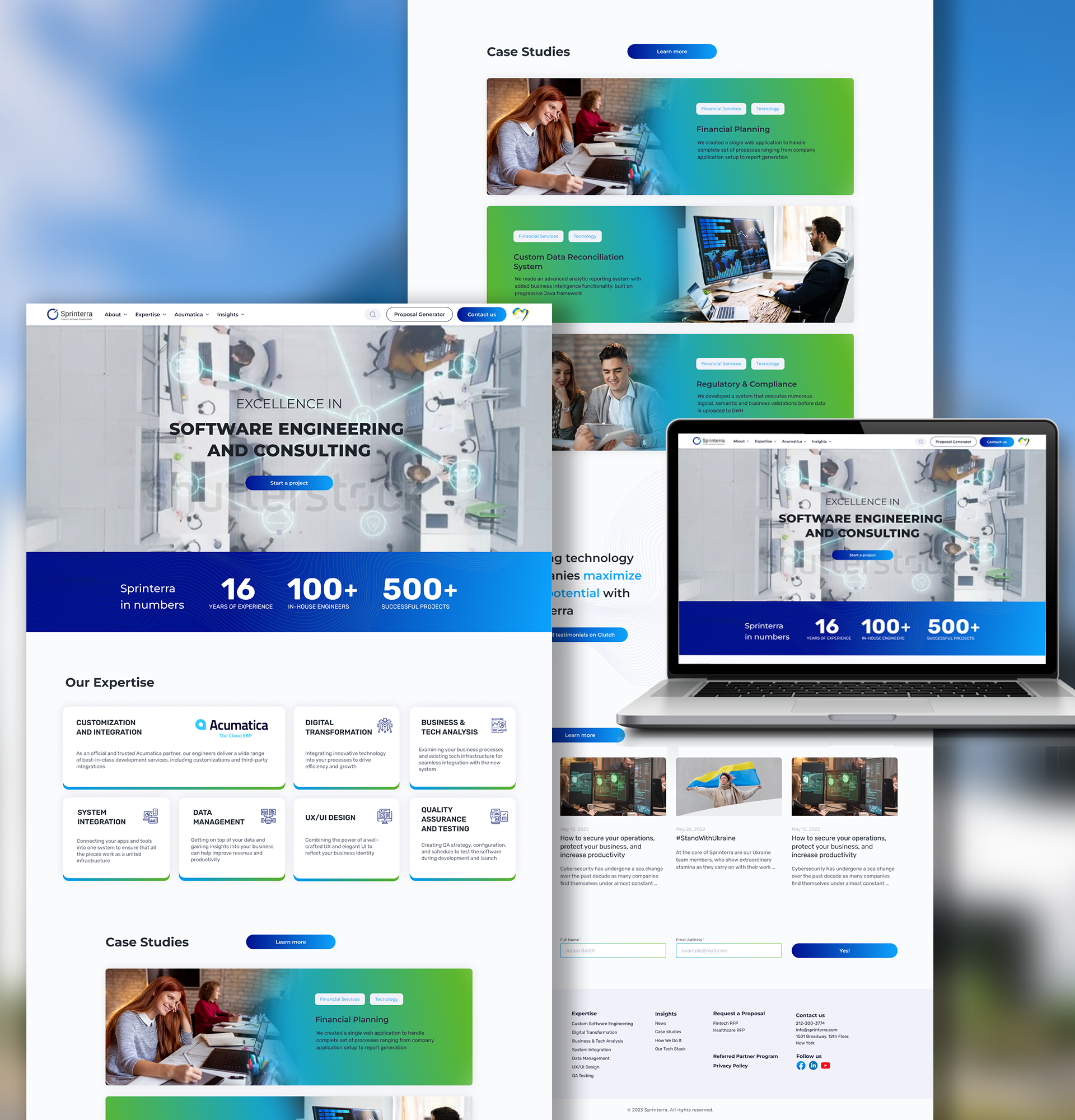
A client example from our own work: Sprinterra, an enterprise software company, came to us after two earlier developers failed to deliver a working WordPress site over eight months. We rebuilt it in roughly two weeks, then layered on SEO and B2B lead generation, and active users grew 226% year to date, with sessions up 184.6% and new users up 237.6%. That was a rebuild of a site that was not working, not a like-for-like migration of an established one, so the numbers are not a promise for every redesign.
Refresh, redesign, or rebuild: how do you decide?
Choosing too small a project leaves the real problem in place. Choosing too large a one adds cost and risk for no gain.
Refresh when the foundation is sound and rankings are healthy but the design is dated. Keep URLs and content.
Redesign when navigation, structure, or conversion paths are the problem but the platform is fine. Expect some URL changes and a full redirect plan.
Rebuild when the platform cannot support the business, the site is slow because of the underlying code, or years of patches have made it too tangled to fix step by step. Migrate with the most care here, and phase the work if the site earns a lot of organic traffic.
An honest assessment comes first. Invisio’s website redesign services start with an audit for that reason: it should name the pages costing you inquiries and say whether a rebuild or targeted fixes is the right answer.
Ecommerce redesigns need extra care
Online stores add product and category URLs, filter and sort parameters, product structured data, merchant feeds, and out-of-stock handling. Discontinued products need a deliberate decision, either a redirect to the closest alternative or a 410, not a redirect to the home page. Planning ecommerce SEO together with the rebuild avoids doing the same structural work twice.

How long does a website redesign take, and what does it cost?
Invisio’s redesign projects typically run 6 to 16 weeks, depending on the size of the current site, the complexity of the build, and how many new features or page types are added. A simple refresh can be faster, and a full custom rebuild with new UX and store functionality takes longer. The SEO preparation in steps one, two, and four adds time at the start and saves far more than it costs, because problems found in a spreadsheet are cheaper than problems found in Search Console.
Cost depends on page count, custom versus template design, required functionality, how much content must be written or migrated, and the complexity of the migration. There is no honest single figure, so give two or three providers the same brief and compare scoped quotes. Our guide to how much a website costs in 2026 explains what drives pricing, and how to choose a web development company lists the questions to ask before you sign. Budget for the first twelve weeks of monitoring and fixes too. They are part of the project.
Plan your redesign so your rankings come with you
A redesign should add leads, not subtract rankings. The difference is almost entirely in the preparation: a benchmark, a decision for every page, a tested redirect map, and a monitored launch.
Invisio Solutions plans website redesigns around that process, from the first audit through post-launch monitoring. Send us your current site and we will return a free written audit within 48 hours, naming the pages that are costing you inquiries and saying whether a rebuild or targeted fixes is the honest answer. Request your free website audit.
Frequently asked questions
- It can, but it does not have to. Temporary ranking fluctuation is normal while Google recrawls a changed site, and Google says it can take a few weeks or more for new URLs to replace the old ones. Lasting damage usually comes from avoidable mistakes: missing redirects, leftover noindex rules, deleted content, and slower pages. A benchmark, a redirect map, and a monitored launch prevent most of them.