
SEO for beginners: essential steps to boost your website

You built your website, launched it, and waited. Nothing happened. No visitors, no leads, no traction. This is the reality for most small business owners who skip SEO or treat it as an afterthought. Search engine optimization is not optional if you want your site to be found. Organic traffic consistently outperforms paid channels for long-term ROI, and the businesses showing up on page one did not get there by accident. This guide walks you through every foundational step, from setting up your tools to creating content that ranks, so you can build real visibility without wasting time on outdated tactics.
Table of Contents
- Understand SEO fundamentals and set up your tools
- Find keywords that attract the right visitors
- Optimize your site: On-page essentials
- Build value through content and avoid common SEO mistakes
- Track your results and continue improving
- What most SEO guides get wrong: The real beginner advantage
- Take your website further with professional support
- Frequently asked questions
Key Takeaways
| Point | Details |
|---|---|
| Solid foundations matter | Start with the basics—set up monitoring tools and understand core SEO concepts before advanced tactics. |
| People-first wins | Write and optimize content for real users instead of chasing search engine tricks or myths. |
| Choose keywords wisely | Selecting relevant, intent-driven keywords leads to more valuable website visitors. |
| Test and measure | Regularly track your SEO results and adjust your strategy based on actual data, not hunches. |
| Beginner edge | Being new to SEO lets you skip bad habits and swiftly apply the latest best practices for faster growth. |
Understand SEO fundamentals and set up your tools
SEO stands for search engine optimization. It is the ongoing process of making your website easier for search engines to find, understand, and recommend to users. Think of it as the infrastructure behind your online presence. Without it, even a beautifully designed site stays invisible.
The AI impact on SEO is real and growing, but the fundamentals have not changed. Google still rewards sites that are technically sound, relevant, and trustworthy. A strong foundation matters more in 2026, not less.
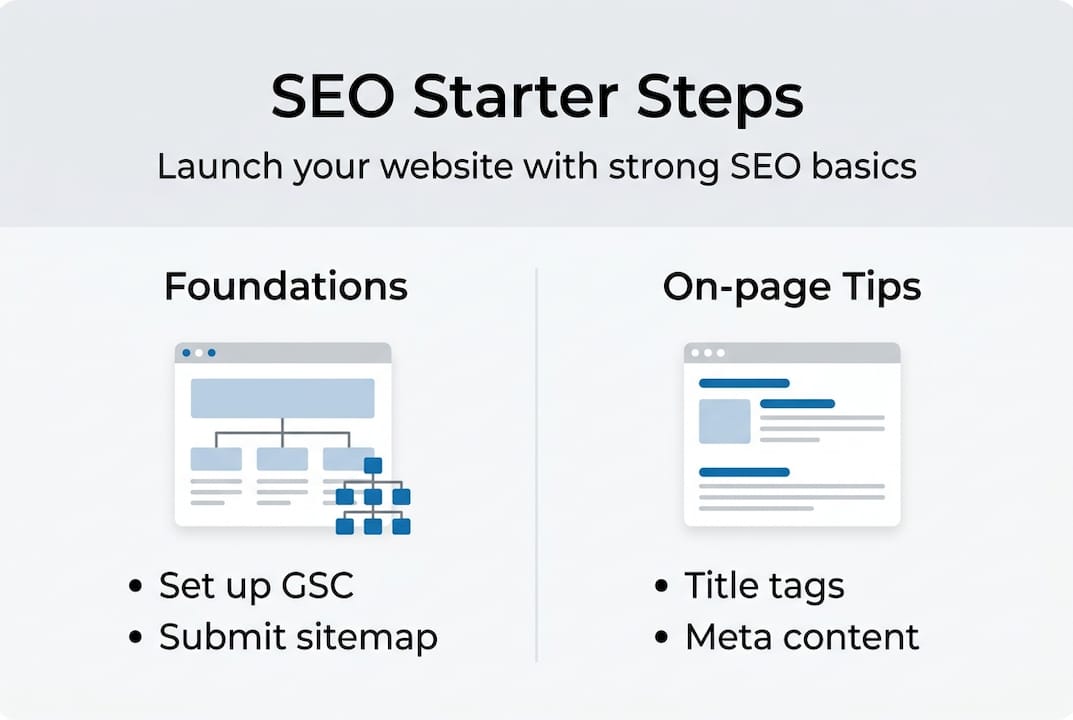
Your first move should be setting up Google Search Console (GSC) and submitting your XML sitemap. GSC shows you exactly how Google sees your site, which pages are indexed, and what search queries bring visitors. It is free, accurate, and directly connected to Google’s search data.
Pro Tip: Start with GSC before any other tool. It gives you real search data for your specific site, not generic industry estimates.
Here are the must-have SEO tools to get started:
| Tool | Free or Paid | Setup Time | Use Case |
|---|---|---|---|
| Google Search Console | Free | 15 minutes | Indexing, clicks, impressions |
| Google Analytics 4 | Free | 30 minutes | Traffic behavior, conversions |
| Bing Webmaster Tools | Free | 15 minutes | Bing search visibility |
| Ubersuggest | Free/Paid | 10 minutes | Keyword research, audits |
| Screaming Frog | Free/Paid | 20 minutes | Technical site crawls |
Once GSC is live, verify your site ownership, submit your sitemap, and check for any crawl errors. These early signals tell Google your site is active and ready to be indexed.
Find keywords that attract the right visitors
With your tools ready and SEO basics in place, it is time to zero in on keywords that will drive the right visitors to your site. Keywords are the terms your ideal customers type into search engines. Choosing the wrong ones wastes your time and budget.

Understanding search intent is critical. Every query falls into one of four categories: informational (learning something), navigational (finding a specific site), transactional (ready to buy), or commercial (comparing options before buying). Matching user intent in your content is one of the most important factors Google uses to rank pages.
Here is a simple process to find the right keywords:
- Type your main service or topic into Google and study the autocomplete suggestions.
- Scroll to the bottom of the results page and review the “related searches” section.
- Use Google Keyword Planner (free with a Google Ads account) to check monthly search volumes.
- Run a competitor’s URL through a free tool like Ubersuggest to see what keywords they rank for.
- Filter your list down to terms with clear intent that match what your business actually offers.
Pro Tip: Focus on keywords your customers would use, not industry jargon. “Affordable web design for small businesses” beats “enterprise UI solutions” for most local service providers.
Avoid the SEO myths to avoid that trip up beginners, like targeting only high-volume keywords. A focused, intent-driven keyword with 200 monthly searches will often outperform a broad term with 20,000 searches and no clear buyer intent. Test your keywords with real content and measure which ones bring actual leads, not just traffic.
| Tool | Cost | Best For |
|---|---|---|
| Google Keyword Planner | Free | Volume and competition data |
| Ubersuggest | Free/Paid | Competitor keywords, content ideas |
| Google Autocomplete | Free | Real-time search behavior |
| AnswerThePublic | Free/Paid | Question-based keyword discovery |
Explore AI-powered search strategies to understand how modern search behavior is shifting and how to stay ahead of it.
Optimize your site: On-page essentials
Once your keyword list is ready, optimizing each page ensures you send the right signals to both users and search engines. On-page SEO covers everything you control directly on the page itself.
Start with these core elements:
- Title tags: Keep them under 60 characters and include your primary keyword near the front.
- Meta descriptions: Write 150 to 160 characters that summarize the page and encourage clicks.
- Headings (H1 to H3): Use one H1 per page, and structure subheadings logically to guide the reader.
- Alt text: Describe every image accurately so search engines and screen readers understand it.
- URL structure: Keep URLs short, descriptive, and keyword-relevant.
Google’s guidance is clear: optimize on-page SEO with title tags under 60 characters, descriptive meta content, proper heading hierarchy, and meaningful alt text. These are not suggestions. They are baseline requirements for competitive rankings.
Pro Tip: Write your title tag and meta description for the human reader first. If it sounds robotic or stuffed with keywords, rewrite it until it reads naturally.
Here is a quick audit checklist for any page on your site:
- Does the page have a unique title tag with the target keyword?
- Is there a compelling meta description under 160 characters?
- Is there exactly one H1 heading that includes the main keyword?
- Are all images labeled with descriptive alt text?
- Is the content organized with logical H2 and H3 subheadings?
- Does the page load quickly and display correctly on mobile?
Common pitfalls like keyword stuffing or obsessing over exact word counts do not improve rankings. They waste your time and can actually hurt your site. Use the technical SEO checklist to audit your pages systematically, or get technical SEO help if you want expert eyes on your site.
Build value through content and avoid common SEO mistakes
Optimizing your site is important, but what truly drives results is quality content and steering clear of rookie mistakes. In 2026, “helpful content” is not a buzzword. It is Google’s primary filter for what ranks and what does not.
People-first content matching user intent drives results and powers AI visibility. This means writing for your actual audience, answering real questions, and providing information people cannot easily find elsewhere.
Content formats that consistently perform well include:
- How-to guides that walk users through a specific problem step by step
- FAQ pages that address common questions in your niche
- Case studies that show real outcomes from your products or services
- Comparison pages that help buyers make informed decisions
- Tool and resource lists that save your audience time
“SEO is not dead. A strong SEO foundation powers visibility in AI-driven search, and businesses that invest in it now will lead in the next wave of search evolution.”
Avoid the traps that waste beginner effort. Keyword stuffing, chasing exact word counts, and obsessing over the “Google Sandbox” are myths that distract from real work. Schema markup and AI-generated content can support your strategy, but they are not shortcuts. They work only when your underlying content is genuinely useful.
Pro Tip: Test every SEO change you make. Publish a page, track it in GSC for 60 days, and measure what moved. Data beats advice every time.
Stay current with AI search updates and understand the future of SEO so your content strategy evolves with the landscape.
Track your results and continue improving
After you publish helpful, optimized content, knowing what is working and what is not is vital for long-term SEO success. Tracking is not optional. It is how you stop guessing and start growing.
Focus on these five core metrics:
- Impressions: How often your pages appear in search results
- Clicks: How many users actually visit your site from search
- Click-through rate (CTR): The percentage of impressions that become clicks
- Average position: Where your pages rank on average for target keywords
- Organic traffic: Total visitors arriving through unpaid search
Here is how to check your results consistently:
- Open Google Search Console and navigate to the Performance report.
- Filter by your top 10 target pages and review impressions, clicks, and CTR.
- Identify pages with high impressions but low CTR. These need better title tags or meta descriptions.
- Open Google Analytics 4 and check which pages drive the most engaged organic sessions.
- Set a monthly review date and compare data period over period.
Statistic callout: AI Overviews now influence 25 to 50% of queries in 2026, which means your content needs to be structured clearly enough for both traditional rankings and AI-generated summaries.
Pro Tip: Do not track 50 keywords at once. Pick 5 to 10 that matter most to your business and watch them closely. Focused tracking leads to faster, smarter improvements.
Use AI-driven SEO mastery resources to stay ahead of algorithm shifts and track SEO progress using the methods Google recommends directly.
What most SEO guides get wrong: The real beginner advantage
Here is something most SEO content will not tell you: beginners in 2026 have a genuine advantage over experienced practitioners who learned SEO five or ten years ago. Those veterans often carry deeply ingrained habits built around tactics that no longer work, or worse, tactics that now actively harm rankings.
When you start fresh, you skip the unlearning phase entirely. You can adopt modern AI SEO tactics from day one without the mental baggage of old keyword density rules or link schemes that once worked but now trigger penalties.
Beginners also adapt faster. When Google rolls out a core update or AI Overviews shift how results appear, someone without years of entrenched habits can pivot quickly. The SEO landscape rewards people who test, measure, and adjust based on real data, not people who rely on what worked in 2018.
The practical wisdom here is simple: focus relentlessly on your users, test every assumption, and treat SEO as a feedback loop rather than a fixed checklist. Those who do that consistently win, regardless of experience level.
Take your website further with professional support
Building your SEO foundation is a strong first step, but the strongest results come from continuous improvement and the right support system behind your strategy.
At Invisio Solutions, we work with small businesses and growing brands to turn SEO knowledge into measurable results. From expert UI/UX design that keeps visitors engaged to proven campaigns like the work behind our digital solutions that deliver, our team handles every layer of your digital presence. Whether you need a full strategy or targeted help with one area, explore our full digital marketing support and take the next step with confidence.
Frequently asked questions
What is the first step in SEO for beginners?
The first step is to set up Google Search Console and submit your website’s XML sitemap so Google can find and index your pages.
How long does it take to see SEO results?
Most beginners notice meaningful changes within 3 to 6 months, though results vary based on competition, content quality, and how consistently you apply best practices.
Do I need to know coding to start SEO?
No, most beginner SEO tasks can be completed without any coding knowledge using tools like Google Search Console, Ubersuggest, and your website’s built-in editor.
Is SEO still relevant with AI in search engines?
Absolutely. A strong SEO foundation powers visibility in both traditional and AI-driven search results, making it more important than ever.
What are common SEO mistakes to avoid?
Avoid chasing myths like keyword density, stuffing keywords into your content, and ignoring user experience. These habits waste time and can damage your rankings.
Recommended
- Small Business SEO | Why You’re Not Ranking | Invisio
- The Master Your SEO: The Ultimate 8-Step Content Auditing Guide
- Mastering SEO For Small Businesses: Guide To Online Growth
- Master SEO For Small Business: 5 Beginner Tips To Improve
- Generative search optimization steps: boost engagement 50% in 2026 | Artificial Intelligence